
Enter Password
UI redesign & feature development for hospital-used medical software,
plus UX process consulting for a medtech startup.
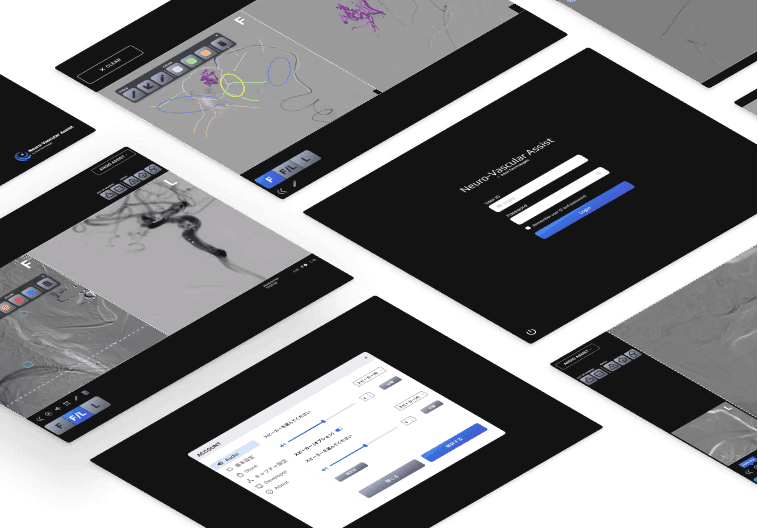
Neuro-Vascular Assist is an AI-powered imaging analysis platform used during endovascular neurosurgery.
Clinical procedures require surgeons to rapidly interpret medical images while managing multiple tools in a high-pressure environment. However, the existing interface had evolved over time without dedicated UX support, resulting in inconsistent interactions, visual clutter, and opportunities to improve usability.
I was brought in to redesign the product experience while balancing clinical workflows, technical constraints, and patient safety considerations.
Redesigned key workflows and interface components to improve usability during clinical procedures.
The redesign introduced a more consistent visual system, improved interaction patterns, and informed future product development through usability testing with surgeons. The software is currently implemented in hospitals across Japan.
Before beginning the redesign, I worked with the client to understand how the software was used in real clinical environments.
Through stakeholder discussions and observation of the product in use, I identified the operational constraints that would shape every design decision.
Design Constraints:
Long viewing distances: Surgeons interact with the software from approximately 1-5 meters away, making visibility and recognition of interface elements critical.
Multi-display environment:The system supports single and dual-screen modes, requiring consistent layouts
Procedures require sustained attention:Interaction is mouse-based, with limited attention during procedures
Alerts rely heavily on sound as well as visual cues
The product must support both Japanese and English users
These insights directly informed key design decisions around visibility, layout flexibility, and multi-modal feedback in a clinical environment.

Kickoff meeting participants: CEO and two engineers from iMed Technologies, along with myself and Shinohara-san (advisor) from the nae team.
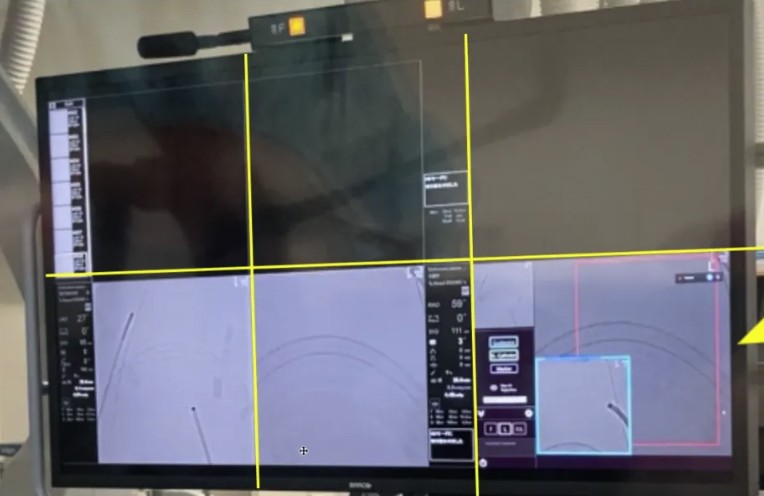
Example of a hospital monitor setup, divided into six screens.
Direct interviews with surgeons were not feasible.
To build a shared understanding of users, I collaborated with the client and project advisor, who had extensive domain expertise, to develop a provisional persona based on clinical workflows and existing knowledge.
To further inform the redesign, I analyzed adjacent medical imaging software and iMed's existing interface to identify common interaction patterns and opportunities for improvement.
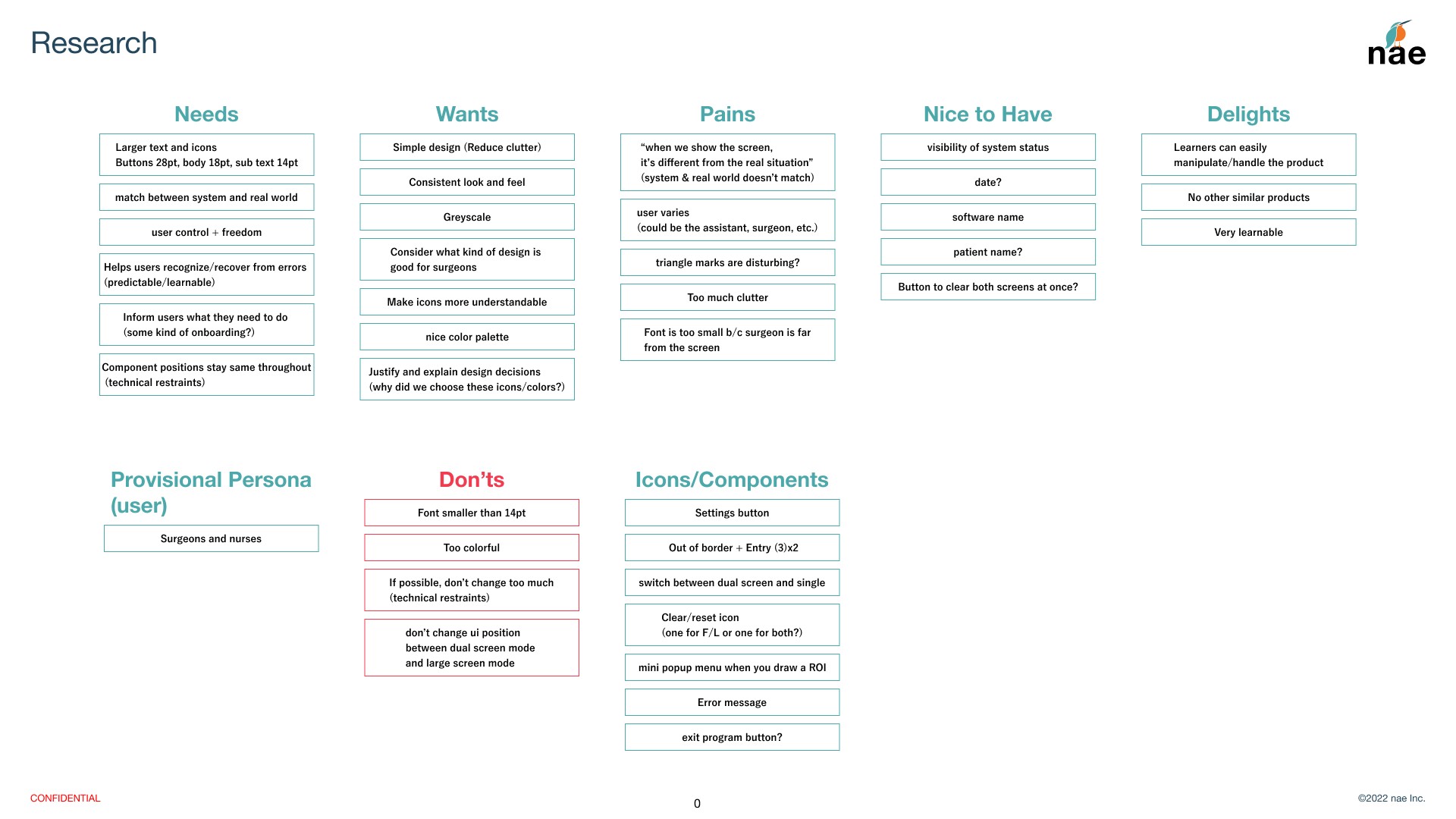
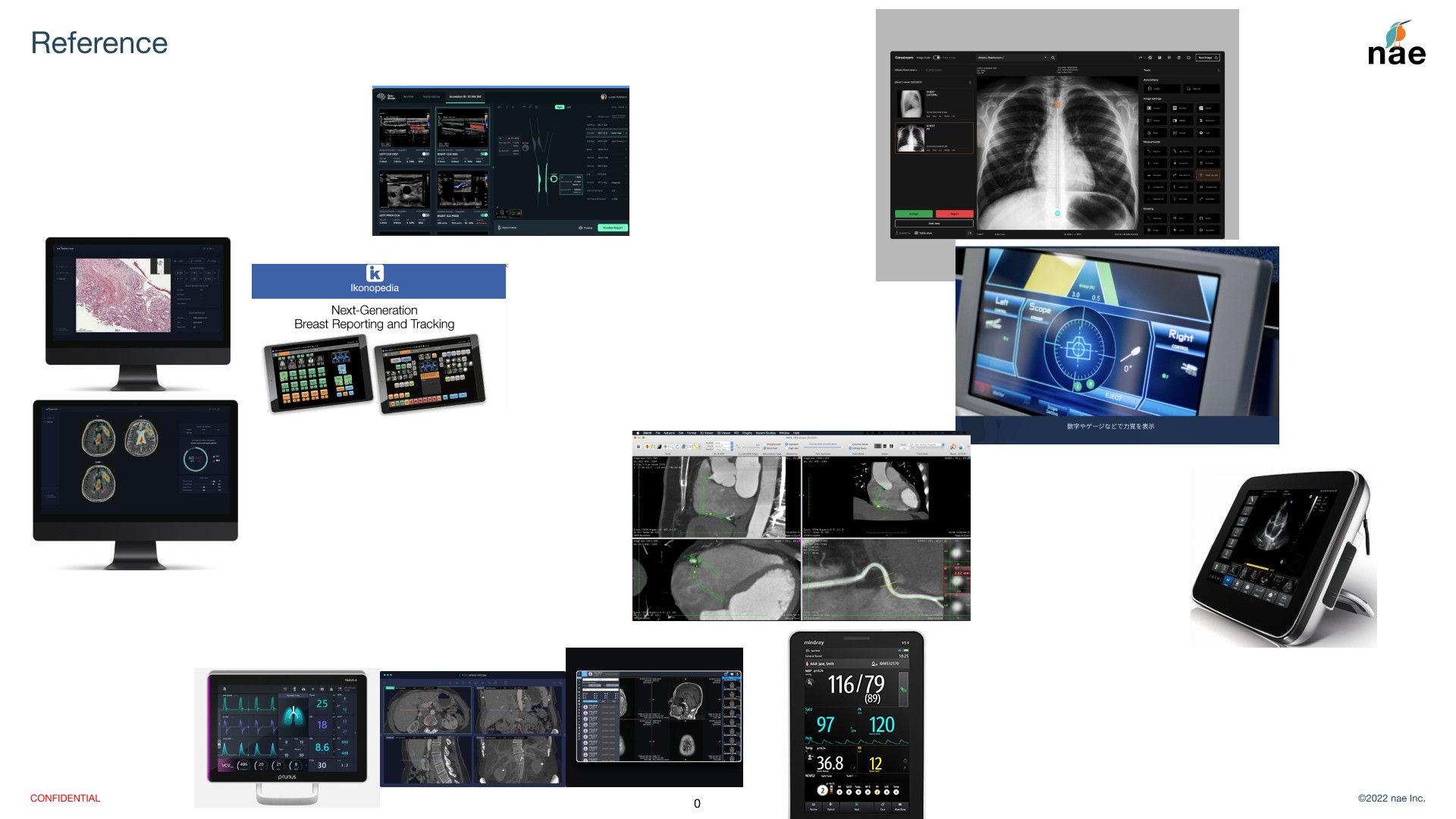
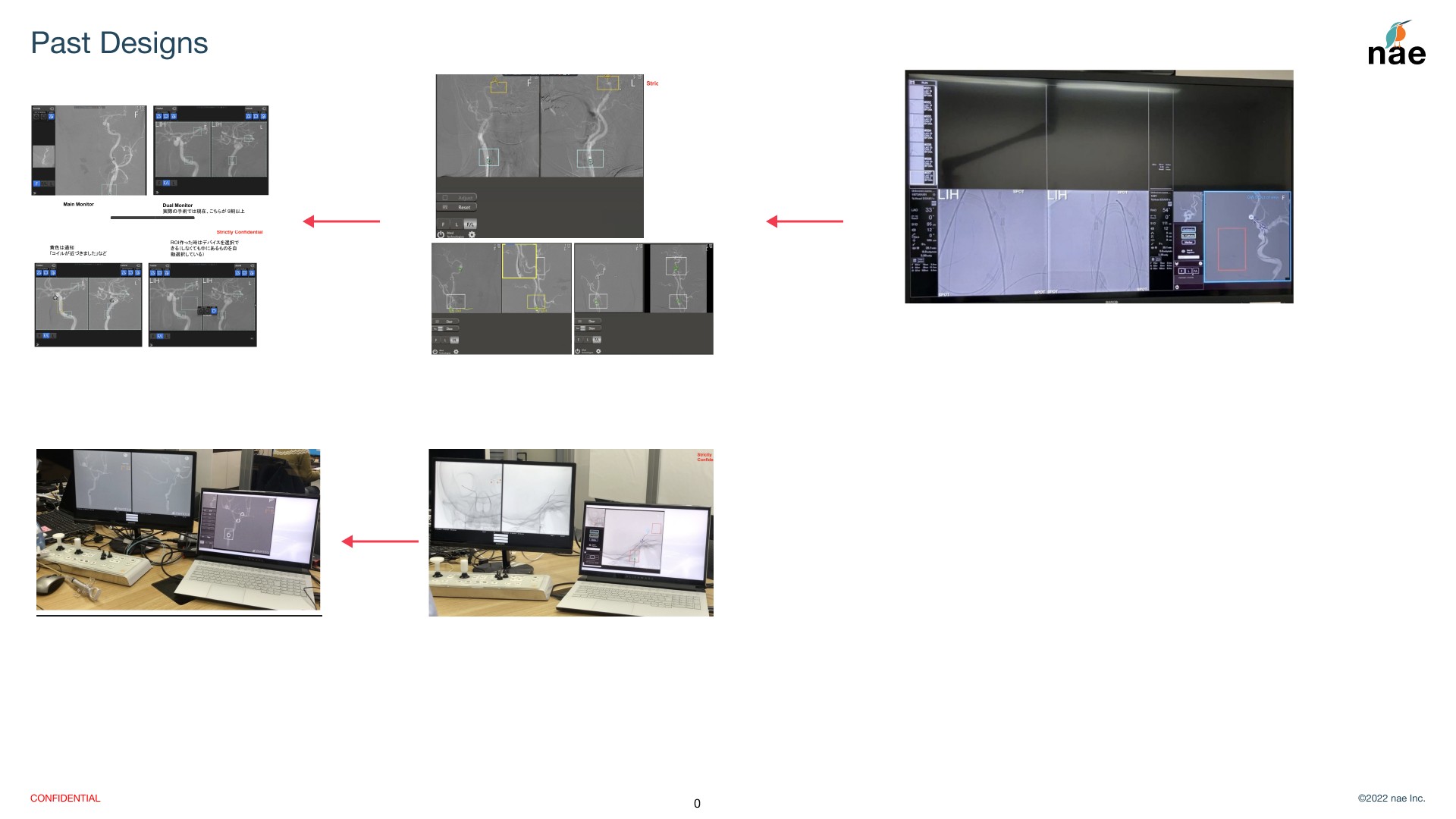
The discovery phase revealed three primary design goals:
Improve visibility from long viewing distances.
Reduce unnecessary visual clutter.
Create a more consistent interface across workflows.
I explored multiple layout directions to balance these goals while respecting technical constraints, including fixed side panel widths and existing engineering limitations.
Each iteration was reviewed with the client and refined based on feedback before progressing to higher-fidelity designs.
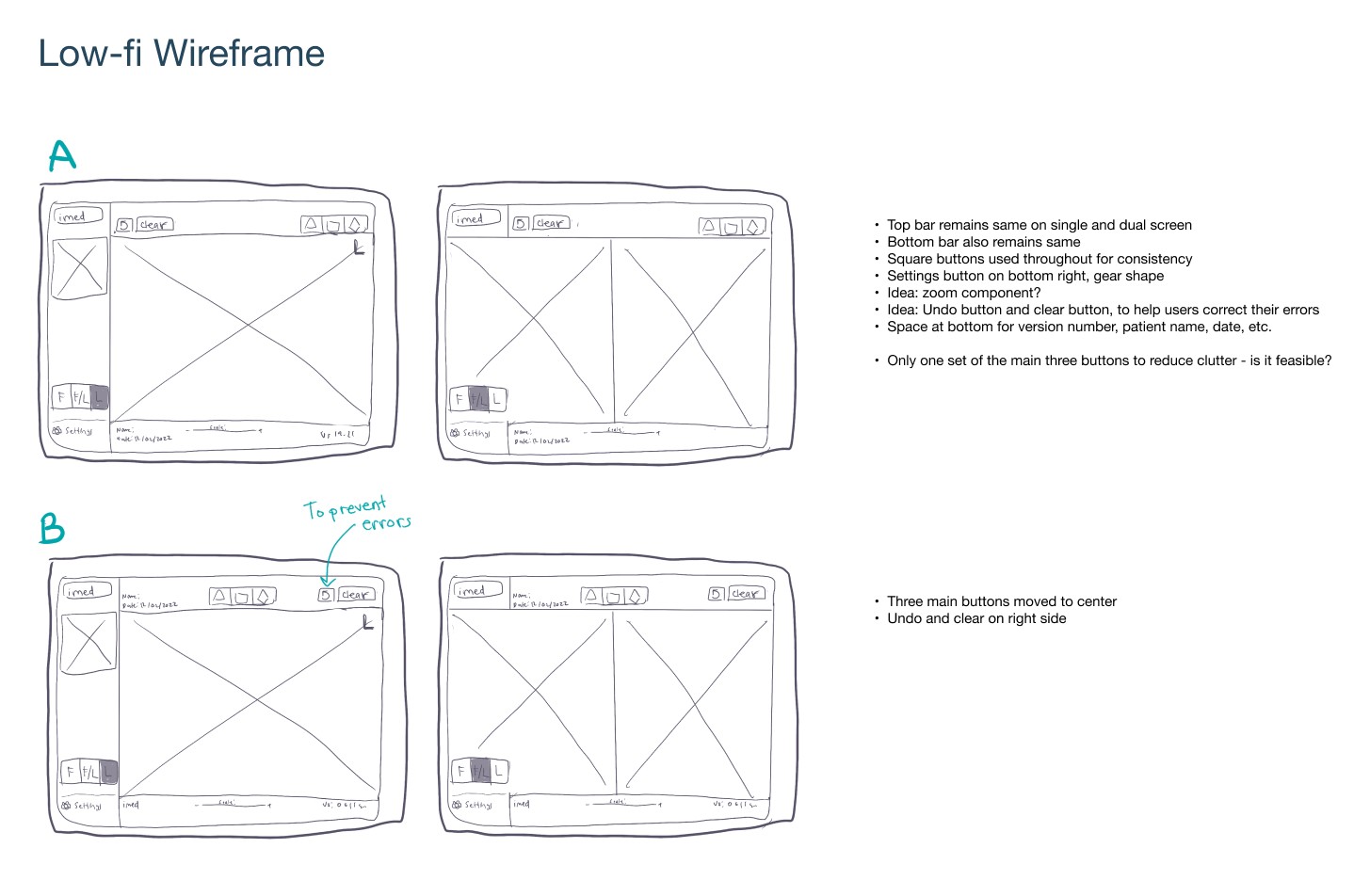
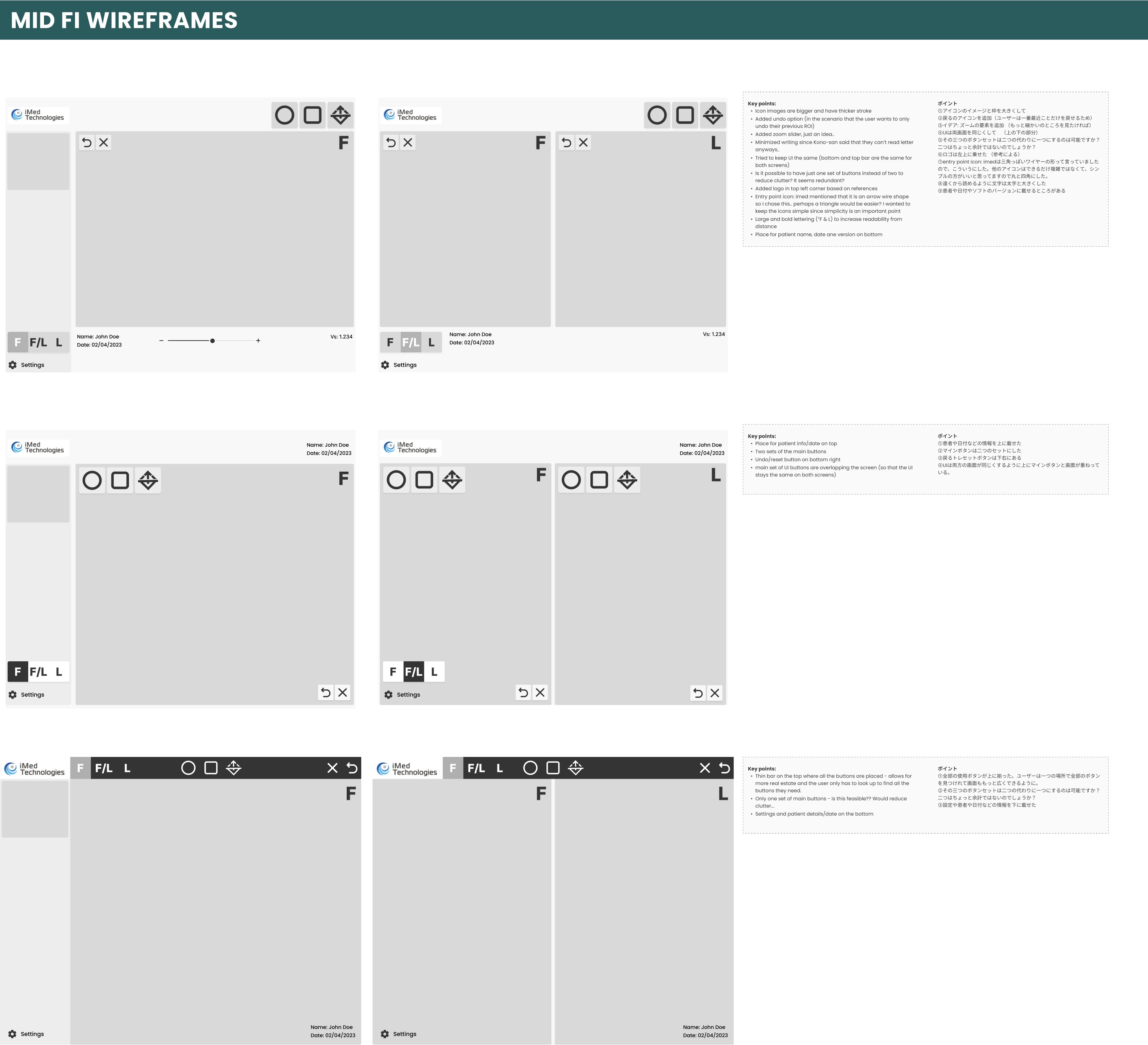
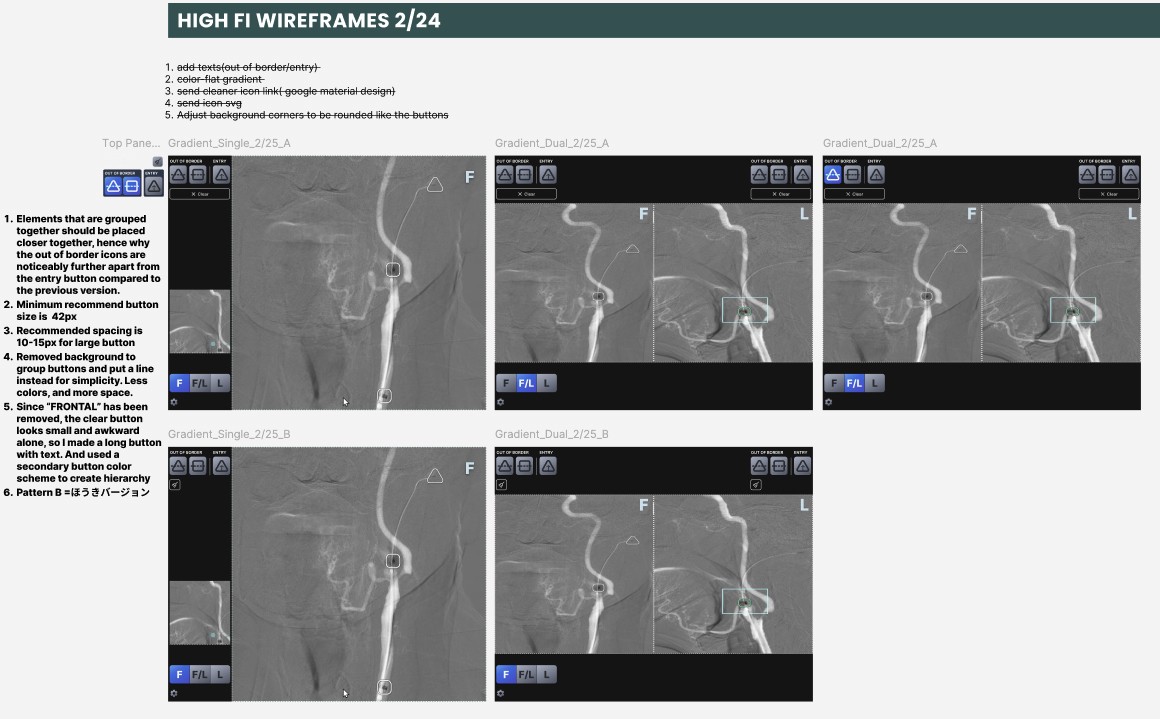
As confidence in the redesign grew, the project expanded beyond the initial interface refresh to include additional workflows such as login, preferences, and annotation tools.
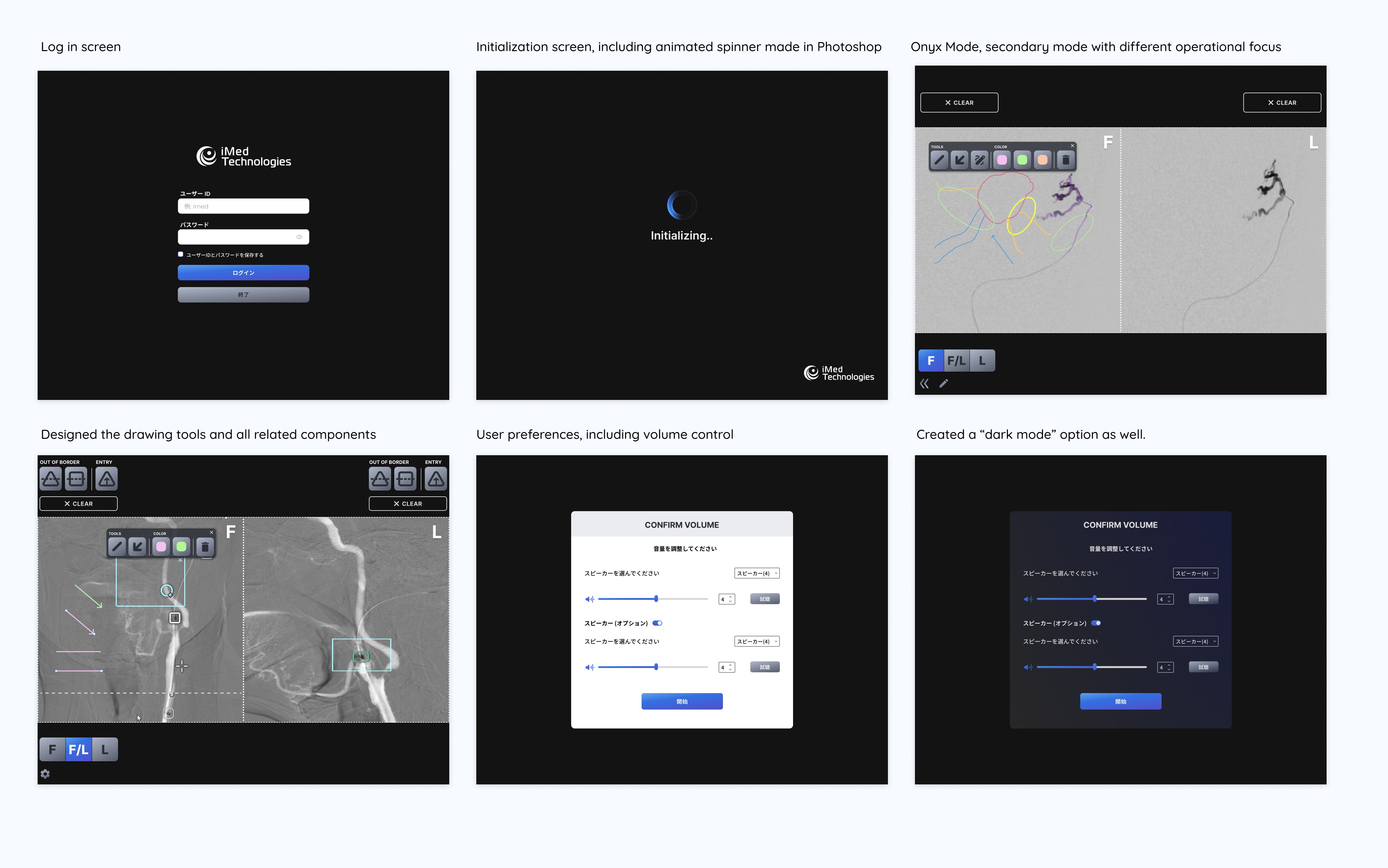
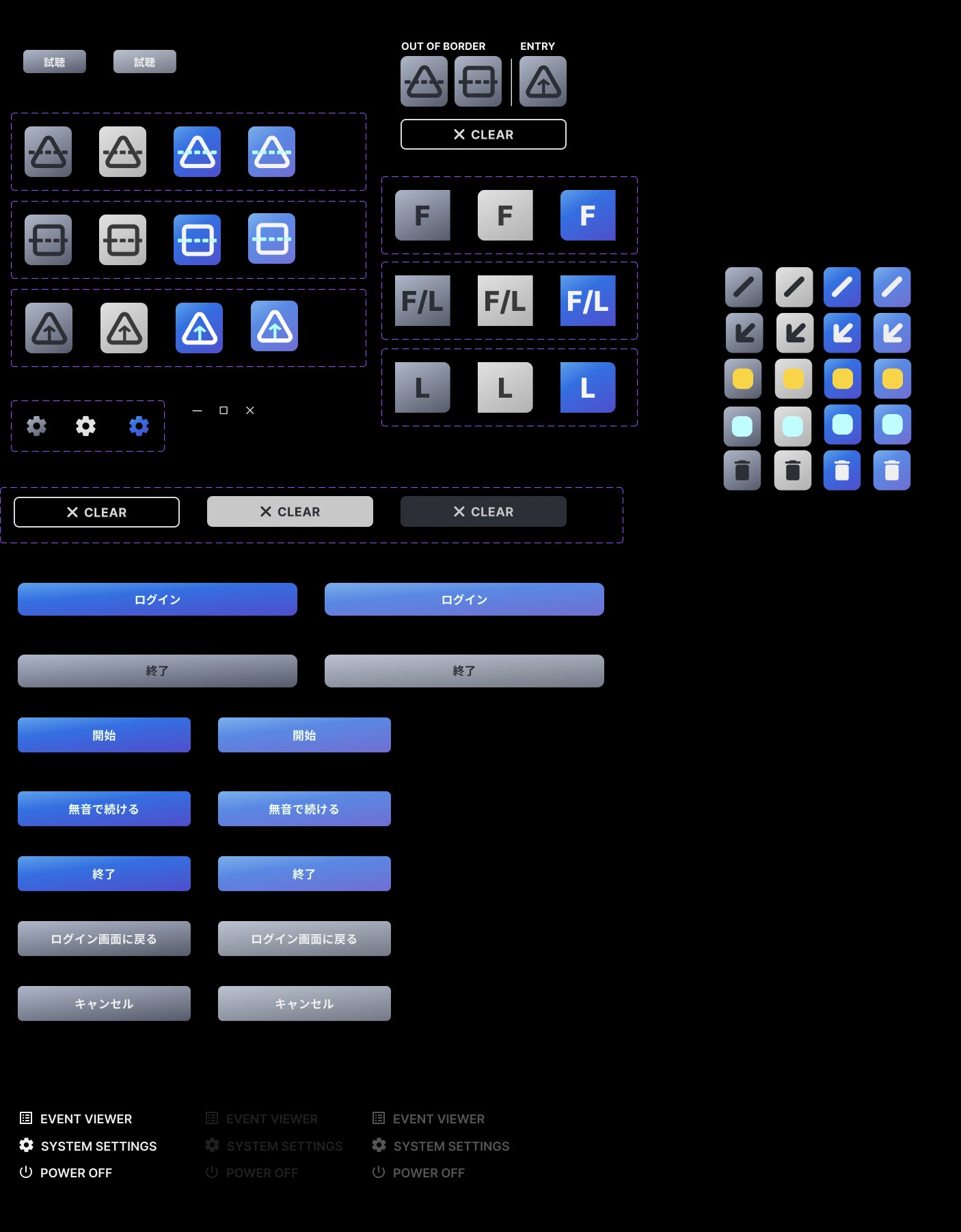
Because surgeons often interact with the software from several meters away, icon recognition became a key usability challenge.
I explored multiple icon styles, sizes, and visual treatments to improve recognition while minimizing obstruction of the medical imagery.

Device Icons Design Exploration

Explored various filter icon options, focusing on a design that maintains visibility of the background while clearly highlighting the small circle shape identified by the filter.
To support engineering handoff and maintain consistency, I also created reusable components, typography, spacing, and interaction patterns to improve design consistency and support future product development.
After engineering implemented the prototype, the software was tested with surgeons in a hospital environment. The sessions focused on how clinicians naturally interacted with the interface during realistic workflows. The testing revealed several unexpected behaviors.
Mode Switching & Current Mode Was Difficult to Identify
Surgeons frequently struggled to switch viewing modes efficiently. Users were sometimes unsure which viewing mode was currently active because the interface provided limited visual feedback.→ Introduced a dedicated mode-switching control with clearer visual differentiation and stronger visual indicators and distinct icons for each viewing mode, making the active state immediately recognizable.
Low Usage of Top Toolbar Controls
Features located in the top toolbar were used far less frequently than expected, while controls related to mode switching were accessed repeatedly.→ Reduced the size and prominence of the top toolbar and repositioned frequently used mode-switching controls closer to the primary viewing area to better match user behavior.
Hidden Preferences Were Frequently Accessed
Settings stored within the Preferences panel, such as volume controls, were accessed more frequently than anticipated during testing.→Identified opportunities to surface high-frequency actions more prominently while keeping less common configuration options within the Preferences menu. Reorganized icons based on visual hierarchy and usage frequency to improve accessibility and discoverability.
Toolbar Buttons Were Too Small
Participants occasionally overlooked or hesitated when selecting smaller toolbar icons, particularly while viewing complex medical imagery.→Increased the size of high-priority controls and simplified the visual hierarchy to improve visibility without unnecessarily obstructing the medical image.

Before and after comparison, with numbered annotations corresponding to the explanations above.
Beyond the original project scope, I identified several interaction patterns that could be simplified to improve clarity and reduce unnecessary complexity.
For example, I recommended separating the notification and markup tools after identifying ambiguity in the shared interaction pattern.
Several of these recommendations were incorporated into future product iterations.

Before: The Notification and Marking functions were combined within the same toolbar, accessed via the pen (markup) icon.
After: I separated the Notification tools into a dedicated function with its own icon, opening a distinct popup panel. This improved clarity and reduced confusion between marking and notification interactions.
I also refined the settings panel after reviewing client changes, including a new size adjustment control. I also challenged the removal of the “Save Changes” button, identifying inconsistency with expected UX patterns. Since changes would require a restart to take effect, I proposed replacing it with a “Restart App” button and a supporting message to clarify system behaviour.
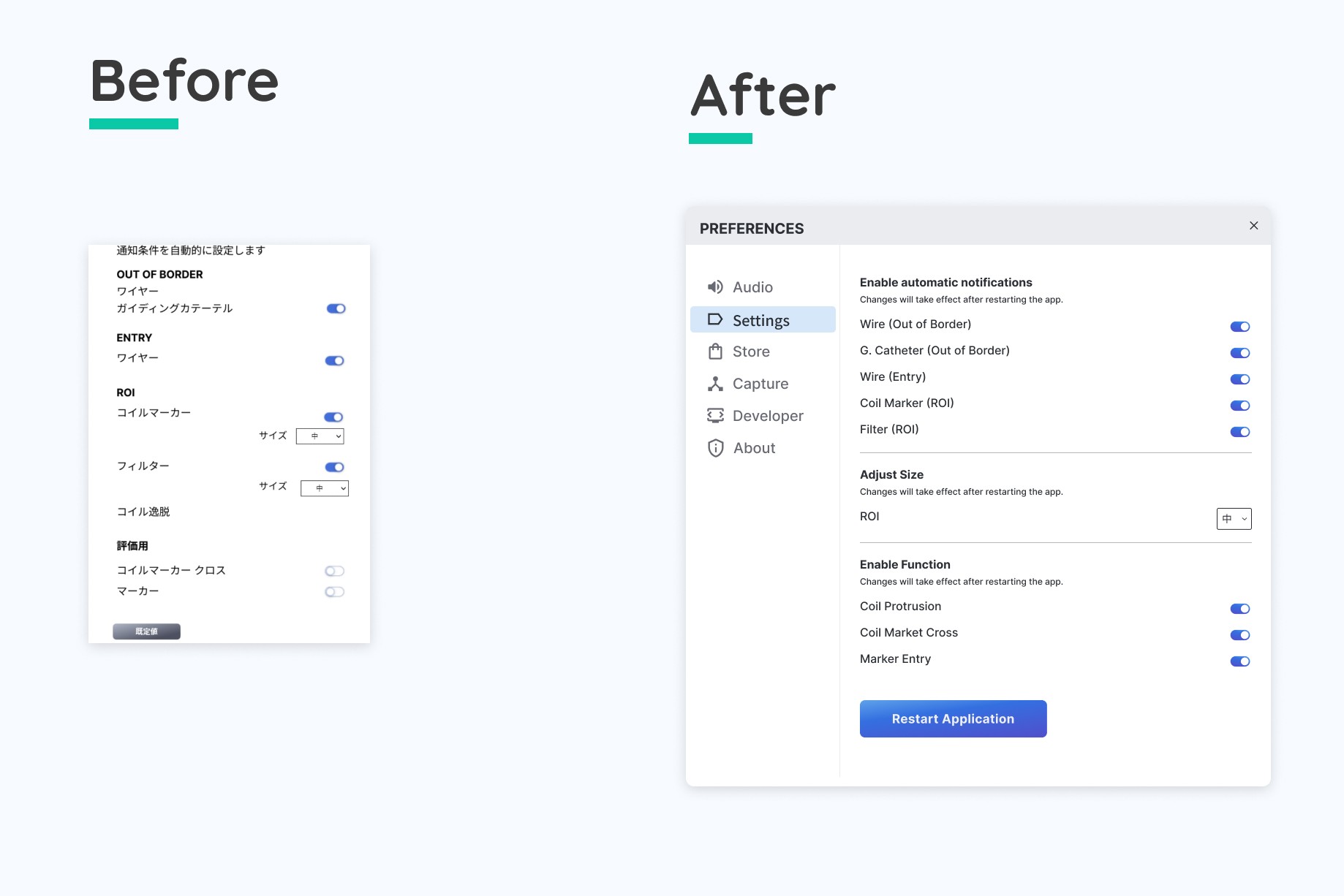
Before: The settings panel lacked clear structure, with size adjustment and save functionality placed in a way that could cause user confusion.
After: I reorganized the settings panel by grouping size controls into a dedicated section and replacing ambiguous save behavior with a clear restart flow and supporting message.
Designing for a highly specialized medical environment reinforced the importance of deeply understanding users before proposing solutions. Working closely with clinicians helped me become familiar with complex medical terminology, clinical workflows, and the environmental constraints of operating rooms. I also explored how audio feedback could complement the visual interface by providing confirmation and reducing the need for users to continuously monitor the screen during procedures.
One of the biggest challenges was balancing user needs with engineering constraints. Fixed layout dimensions and implementation limitations restricted how much the interface could change, requiring careful prioritization of features while maintaining readability, visibility, and usability within a limited screen space.
Because clinicians often interact with the software while performing procedures, every design decision needed to support quick recognition rather than prolonged attention. This reinforced the importance of clear visual hierarchy, readable typography, and reducing cognitive load throughout the interface.
Looking Back:
If I had the opportunity to continue this project, I would prioritize contextual observation in the operating room to better understand how clinicians interact with the software during live procedures. Although direct observation was not feasible due to clinical regulations and consent requirements, it would provide valuable insights into environmental factors, interruptions, and decision-making under real-world conditions.
© 2026 Crystal Ma. All rights reserved.